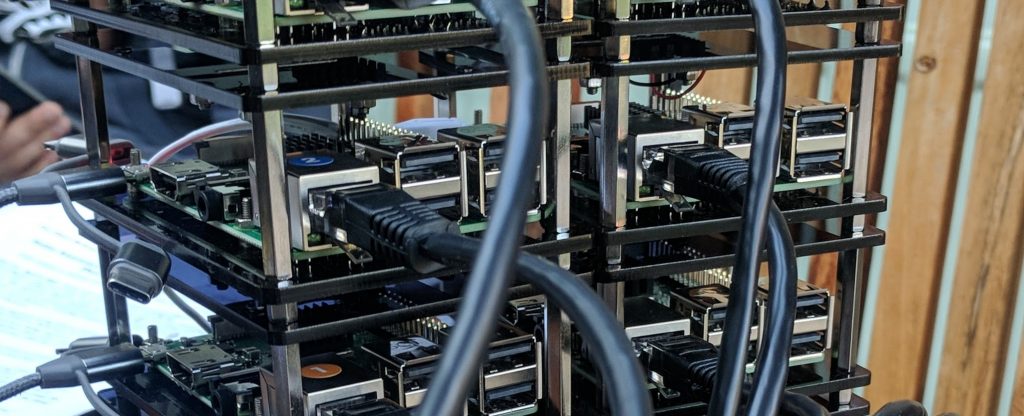
A while back we put together a Kafka cluster with Raspberry Pis to test some real-time data streaming use cases. After a while it had to be temporarily decommissioned while we worked on other things but now we’re bringing her back!
A quick rundown on the cluster:
- 7 Raspberry Pi 3B+
- OS Raspbian Stretch Lite
- 1 Zookeeper instance
- 6 Kafka Brokers
Getting started with Kafka is as simple as heading over to the quickstart section of the Kafka docs and following the step-by-step instructions so I won’t repeat them here, go dig in for yourself. Instead, I want to go over the solutions to a couple of the problems I ran into in the parts that I worked on.
Problem 1 – Java Wants More Memory
Figuring out how to solve this (I know next to nothing about Java) was the absolute number one biggest nightmare that I ran into while trying to get Kafka to start on the Pi.
The RasPi 4 came out after we built the cluster. The 2GB or 4GB versions would probably run Kafka just fine out-of-the-box. In our case, we’re running on RasPi 3B+, with only 1GB of RAM to work with. From my very basic understanding, when the Kafka server application starts, Java (on which Kafka is built) starts up a JVM (Java Virtual Machine) and allocates itself a portion of memory for it’s own use, referred to as the heap. The default for Kafka is 1GB so every time you try to start a Kafka server on a RasPi 3B+ with 1GB of memory you get a Java exception.
java.io.IOException: Map failed
java.lang.OutOfMemoryError: Map failed
The solution is to alter a variable in the kafka_server_start.sh file, KAFKA_HEAP_OPTS.
Find the following line in the kafka_server_start.sh file:
export KAFKA_HEAP_OPTS="-Xmx1G -Xms1G"
Changing it to the following made Kafka start up easy as Pi.
export KAFKA_HEAP_OPTS="-Xmx512M -Xms512M"
Victory!
Problem 2 – Too Much Data, Too Little SD
When we first put the cluster together we used 16GB SD cards. With the log retention policy set to a default of 168 hours and more and more data streaming to the cluster as we came up with more ideas for things to measure or collect and stream, the SDs were full to busting in under a week. There are a few ways to solve this issue and we are using a combination of them.
- Manually flushing the logs is a temporary solution, the data will collect up again in time I suggest doing it as a troubleshooting measure rather than a way of dealing with the underlying problem
- Change the log retention policy. We have a Pi with InfluxDB, consuming the topic data into a database, meaning for our setup Kafka has to act as a data cache only for as long as the consumer Pi is likely to ever be down.
- open config/server.properties with your preferred text editor app
- change
log.retention.hours=168to the value of your choice, we chose 24.
- Use bigger SD cards, which we also have done.
- Clone your SD card onto a large SD
- Expand the root partition to fill the SD card
Problem 3 – Connecting With the Outside World
Configuring the networking and Kafka server properties for the cluster to communicate with itself was a fairly simple matter but did require some forethought. I will probably write a separate tutorial for it at some point but I didn’t run into any issues so it is outside the scope of this blog.
The problem came when we had a producer script on a Pi Zero W connected to an external network, gathering environment data such as the temperature and pressure. In addition, we had a similar (now almost completed) project in mind for an OBD data reader/streamer which would have to also be externally connected via the internet. Port forwarding was set up on the router and I could not figure out why Kafka wouldn’t connect over a WAN when SSH worked fine.
Within the config/server.properties file, and the descriptions in the docs something that wasn’t immediately obvious to me was the distinction between listeners and advertised.listeners. In order for a device to connect to the cluster over WAN you need to make sure your server.properties file contains the following two lines (replace sections in square brackets [] with your own details).
listeners=[PROTOCOL]://[your.local.ip.address]:[kafka-port]advertised.listeners=[PROTOCOL]://[your.public.ip.address]:[kafka-port]
Now (provided everything else is configured correctly 😉 ) you can connect to the cluster with producers and consumers that are on remote devices.
Problem 4 – Kafka Server Goes Down but Port Stays Open and Listening
This has happened a few times, a server goes down for some reason, or you shut it down but the port stays open and listening. Kafka and/or Zookeeper won’t start because they are unable to bind to the port specified in the config file. You can try finding a PID using lsof -i -P -n and kill it but that doesn’t always work. Sadly, the easiest way to guarantee that everything will start up again is a good old fashioned time consuming reboot.
